
In this lesson on How to Master Clip Effects in Premiere Pro from David Bode’s FREE Premiere Pro Tutorial Course, you will learn how to apply effects to your source clips to save you time and energy. What Is a Source Clip? Source clips (previously known as master clips) are objects in the Project panel… Continue reading How to Master Clip Effects in Premiere Pro
Tag: ich
Wedding Photography Checklist, The Essentials & Must-Have Shots [Examples & tips]
How to avoid disappointment and take the shots your clients really want! I know you are wondering – “Do I really need a wedding photo checklist?” The answer is a unanimous yes, We put together this helpful wedding photography checklist as a lifesafer for that big day. Hope it helps. Your Free Printable Wedding… Continue reading Wedding Photography Checklist, The Essentials & Must-Have Shots [Examples & tips]
Take to the skies in style with the new Peak Design x Huckberry 30L travel pack
Retailing for $260, the expandable pack neatly organizes all your gear. Peak Design/Huckberry Photographers are familiar with the refrain, “how will I carry it all?”—all being the cameras, lenses, laptops, and other gear necessary for a good and proper adventure. Peak Design answered that question in 2018 with its original Travel Backpack. Now, the brand… Continue reading Take to the skies in style with the new Peak Design x Huckberry 30L travel pack
For the film lover: How to choose your camera and film type
In 2017, Kodak brought back Ektachrome color-positive film; in 2018, they revived T-Max P3200 B&W film. In 2019, FujiFilm announced they’d bring back black and white film, launching Neopan 100 Acros II in both 35mm and 120 formats. And this year, Kodak brought back the 120 version of Gold 200. It’s safe to say that… Continue reading For the film lover: How to choose your camera and film type
How to Use the Freeform View in Premiere Pro

In this lesson from David Bode’s FREE Ultimate Premiere FAQ course, you’ll learn how to use the Freeform view to review, organise, and prepare media for your projects. The Freeform View is one of those great features in Premiere Pro that will help you create a visual workflow for your clips much more easily than… Continue reading How to Use the Freeform View in Premiere Pro
10 Top Tips for Designing a Cartoon Character for 2D Animation

If you love cartoons, why not try your hand at designing a cartoon character? After all, every expert started as a beginner. It’s easier than you think. Just follow these ten top tips and you’ll have a stunning character ready to animate in no time. 1. Keep It Simple Cartoons come in a wide variety of… Continue reading 10 Top Tips for Designing a Cartoon Character for 2D Animation
David Ulrich: How to be a more mindful photographer
Swimming Pool, Cape Cod, MA. © David Ulrich David Ulrich is a photographer, writer, and teacher. He worked as an assistant to Minor White, drank with Ansel Adams, and crossed paths with many of the great photographers of the late 20th century. His life was changed when he witnessed the Kent State shootings in 1970,… Continue reading David Ulrich: How to be a more mindful photographer
New gear: Sigma 20mm & 24mm f/1.4 full-frame primes
The new lenses will be available in E- and L-mount. Sigma You can start your week with some good news if you’re in the market for a wide-angle lens and shoot a full-frame E-mount or L-mount camera: Sigma has just announced two new Art-series, wide-angle primes—the Sigma 20mm f/1.4 DG DN and Sigma 24mm f/1.4… Continue reading New gear: Sigma 20mm & 24mm f/1.4 full-frame primes
How to Process Raw Photos With Filmulator (Free for Windows and Linux)
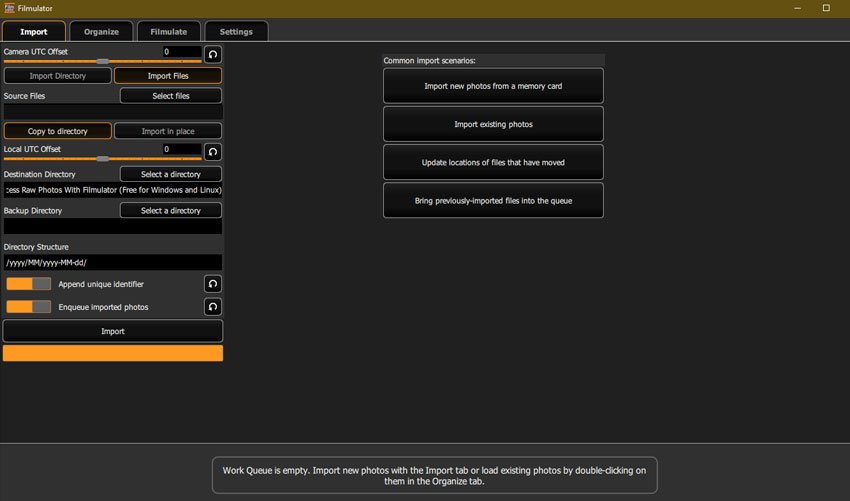
Filmulator is an open-source raw photo editor based around the filming developing process, with a library management feature to help you organise your photographs. It’s free and available for both Windows and Linux users. Here, we’ll take a look at its main features and walk you through how to edit your images. How to Process… Continue reading How to Process Raw Photos With Filmulator (Free for Windows and Linux)
How to Use Use Auto-Reframe to Crop Your Video in Premiere Pro

In this lesson from David Bode’s FREE Ultimate Premiere FAQ course, you’re going to learn how to use Auto-Reframe to reframe your videos for different aspect ratio outputs. Varying Video Formats 1920 by 1080 is a pretty standard size for videos, but with the popularity of social media, both vertical and square videos have become… Continue reading How to Use Use Auto-Reframe to Crop Your Video in Premiere Pro